User guide
Everything an owner needs: install, open the local web app, connect your agents, manage your license from the UI, and keep things updated.
1 — Install
macOS / Linux — paste in a terminal:
curl -fsSL https://snippets-vault.pages.dev/install.sh | bashWindows — paste in PowerShell:
powershell -ExecutionPolicy Bypass -c "irm https://snippets-vault.pages.dev/install.ps1 | iex"The installer checks for Node.js (and installs it if missing), installs Snippets Vault
to ~/snippet-vault, connects your AI agents, starts your free trial, and
adds the snippets-vault command (plus a "Snippets Vault" entry in your
app menu on Linux). Restart your agent afterwards.
Prefer to see every step — with screenshots — before you run anything? Use the step-by-step install walkthrough, which also covers Node.js checks, the manual zip route, and what to do if a step fails.
2 — Open the local web app
No folders, no commands — any of these opens the UI in your browser:
- App menu: search "Snippets Vault" and click it (Linux — added by the installer).
- Any terminal:
snippets-vault— starts the UI if it isn't running, then openshttp://localhost:8787. Also:snippets-vault stop,snippets-vault status. - The classic way: in the
snippet-vaultfolder runnpm run web— the browser opens automatically, and if the UI is already running the same command just opens the existing page.
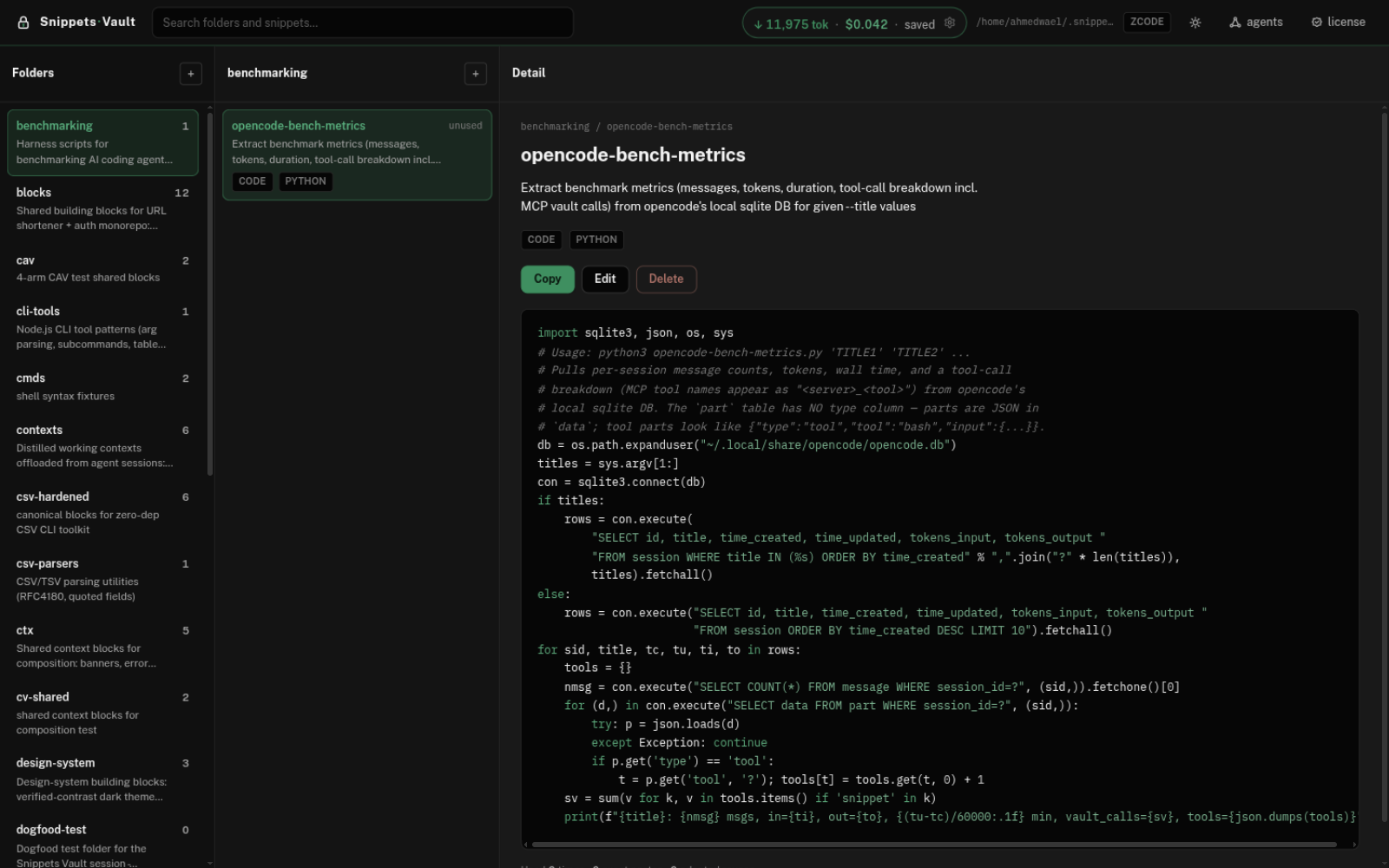
The top bar, left to right:
- Search — finds folders and snippets as you type.
- Savings counter — the tokens your agent did not have to retype, and what that is worth at your token price. Click the gear on the chip to set your real price per 1M tokens (for example 3 → 3.5) so the savings figure matches your plan.
- agents — detect the AI coding tools on this machine and connect them (next section).
- license — license status, activation, free trial, and key renewal — all without touching a terminal.
The three panes: pick a folder, then a snippet, and
the right pane shows the stored code with its stats. The + buttons
create new folders and snippets; everything lives as plain files in
~/.snippet-vault — back that folder up and you've backed up everything.
First run after unzipping by hand? cd into the extracted
folder first — every command below runs from there.
npm run web installs its dependencies automatically.
Offline, or prefer doing it yourself once:
cd ~/snippet-vaultnpm install --omit=devPort 8787 taken by another program? Start it on another port:
PORT=8788 npm run web → http://localhost:87883 — Connect your AI agents
Click agents in the top bar. The vault scans this machine for every AI coding tool it supports and tells you exactly what it found:
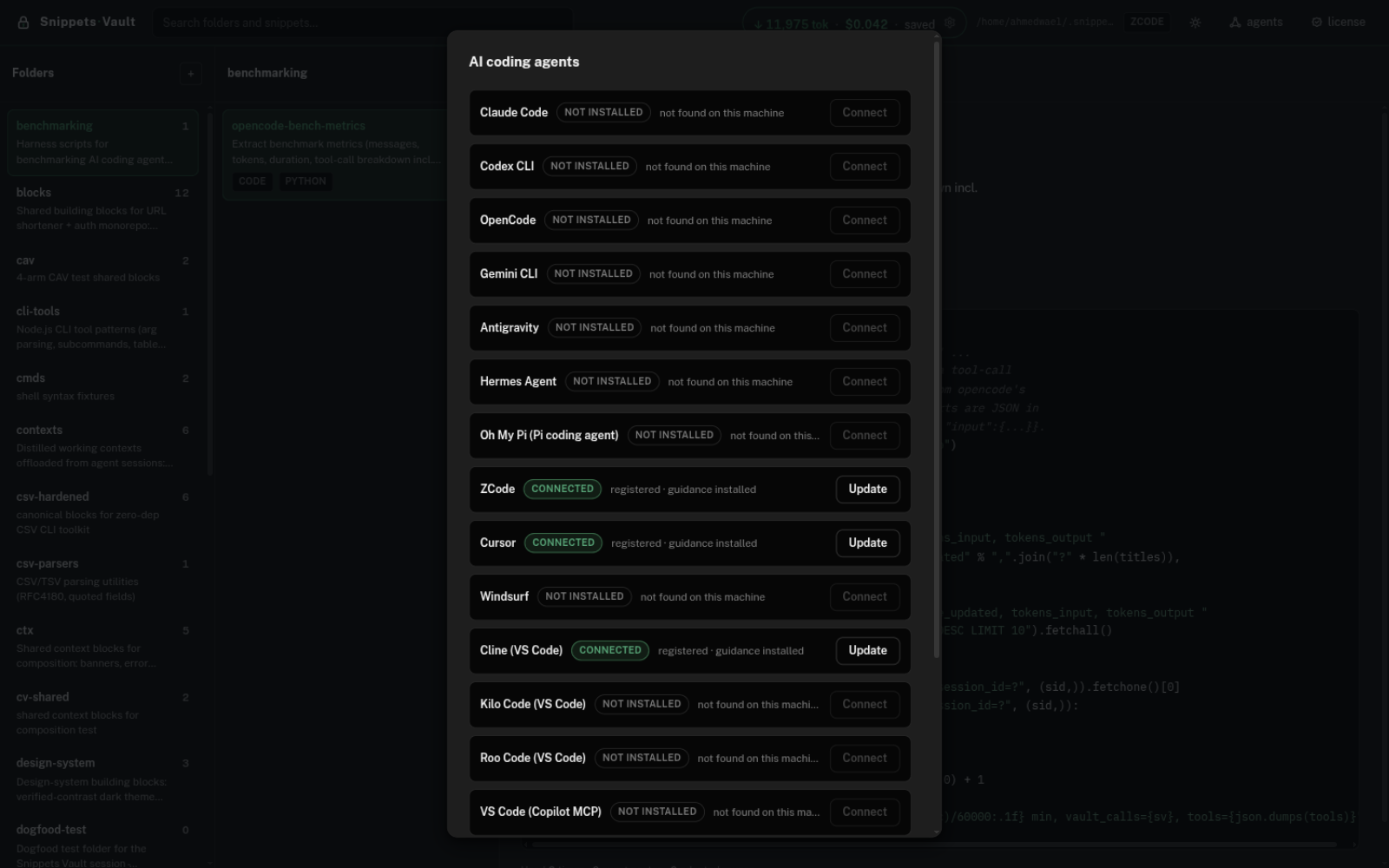
- connected — the tool is installed AND wired to the vault. A Update button re-registers and refreshes its guidance to this version.
- detected — the tool is installed but not wired yet; click Connect.
- not installed — the tool isn't on this machine; its button is disabled. Uninstalled a tool? It leaves the connected list automatically.
Connecting registers the vault's MCP server with that agent and installs its usage
guidance and skills. Restart the agent after connecting so it picks
up the tools. Prefer the terminal? node scripts/setup.js does the same scan.
4 — License: activate, trial, renew
Click license in the top bar. The dialog shows your current status and everything you can do about it:
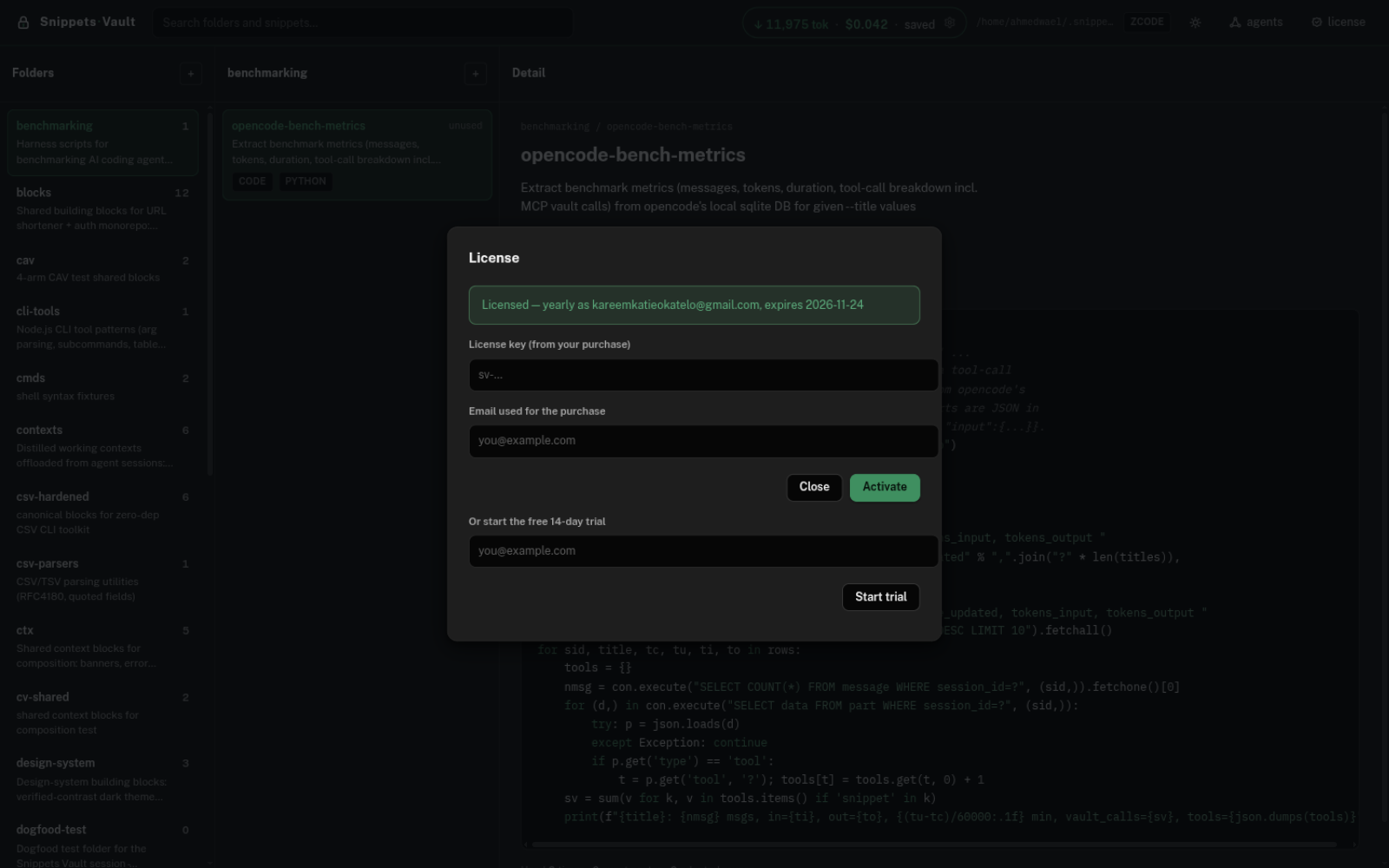
- Activate a key: paste the key (
sv-…) and the purchase email, press Activate. Lifetime keys showexpires 2100-01-01— keys are tied to your account, not to a machine: activate the same key on as many machines as you like, and everything keeps working offline forever. - No key yet: start the free 14-day trial from the same dialog. One trial per email — use it on any machine.
- Key expired or revoked? The dialog says so and shows the key box with a hint — enter the new key and everything returns on the agent's next start. Your snippets are never touched.
- Terminal way:
node scripts/license.mjs activate sv-YOUR-KEY
          --server https://snippet-vault-licenses.snippet-vault.workers.dev --email you@example.com
, andnode scripts/license.mjs statusto check.
Lost your key? The "Lost your key?" box on the home page recovers it with your PayPal order id.
5 — Work with your agent
After install, just talk normally. Things your agent now does on its own:
"save this for reuse" → saves it to the vault with a description"add the same handler as a POST" → pastes the saved bytes, swapping get→post"make this our standard router pattern" → extracts & saves the pattern from your codebaseSaved snippets live as plain files in ~/.snippet-vault — back that folder
up and you've backed up everything.
6 — Power move: the two-AI setup
Because the vault is one shared library, two different models can collaborate through it — a stronger model as the architect, a faster/cheaper model as the builder:
1. Strong model (architect): "read this spec and save production-grade snippets for it to folder 'blueprint'"2. Weak/fast model (builder): "build the spec; check folder 'blueprint' first and paste what fits"In our recorded test, snippets authored by a larger model lifted a smaller model's output from 14 to 18 passing tests with cleaner structure — the small model adapted (not blindly pasted) via paste-time find/replace. Tips that made it work:
- Architect: write snippets in the builder project's exact language, framework, and naming — match the spec, not your own taste.
- Architect: keep units small (one middleware, one store) and put searchable keywords in each description.
- Builder: treat seeded snippets as drafts — adapt anything that doesn't match the spec before using it.
- The same trick works across machines: copy or sync
~/.snippet-vault/libraryand any agent on any machine shares the same snippets and skills.
7 — Update
node scripts/upgrade.mjs --check → see if a new version existsnode scripts/upgrade.mjs → update (snippets + license untouched)The home page's "Check my version" button does the check from the browser. When an update exists, an update button appears in the local app's top bar — click it and the UI reloads on the new version.
8 — If your antivirus flags the installer
Snippets Vault rewrites its own code at build time as an anti-tampering measure. A few heuristic scanners treat that pattern as suspicious even though the tool only manages your own local snippet files. Here's how to be sure you have the real thing:
- Verify the hash. Every release publishes its exact SHA-256 in
version.json. On Windows PowerShell:Get-FileHash snippet-vault.zip— it must match the published value for that version, byte for byte. - Only download from the official site (this one) — the install button fetches a fixed, hash-pinned archive.
- Report the false positive so your vendor allowlists the next release: Microsoft · Avast/AVG · Kaspersky · Bitdefender. Submissions are reviewed by humans, usually within days.
Nothing in the vault phones home: no telemetry, no account, your library never leaves your disk unless you copy it yourself.